AI Agents vs. AI Automation: Differences, Use Cases, and When to Use Each
AI automation follows predefined triggers and steps. An AI agent receives a goal, examines context, chooses tools and next steps, and adapts based on results. Use automation for stable, repetitive, high-volume work. Use an agent for variable, multi-step work that requires interpretation. In production, the strongest design is often hybrid: the agent handles understanding, planning, and exceptions; deterministic systems perform sensitive actions; and people approve high-risk changes.
This is not just a product definition. We ran a controlled project-reporting task in xAgent and retained the persistent plan, task progression, deletion approval, generated artifacts, independent inspection, and repair plan. The central finding was simple: an agent can resolve work that is difficult to predefine as a workflow, but “task complete” is not the same as “result verified.”
AI Agents vs. AI Automation at a Glance
| Dimension | AI automation | AI agent |
|---|---|---|
| Input | Stable events, forms, or records | A goal, natural language, and varied context |
| Path | Every step and branch is predefined | The agent chooses steps and tools within permissions |
| Change handling | Uncovered cases normally enter an exception path | Can interpret new cases and revise its plan, but may judge incorrectly |
| Output | Predefined fields or deterministic actions | Documents, recommendations, tool calls, and follow-up plans |
| Failure modes | Rule errors, integration failures, or invalid input | Also includes misreading, omission, unsupported inference, and false completion claims |
| Validation | Assert fields, status codes, and workflow outcomes | Check sources, process, artifact structure, and semantic accuracy |
| Cost | Usually low and predictable per run | Varies with model reasoning, context, and repeated tool calls |
| Control | The workflow itself defines the boundary | Requires permissions, workspaces, approval, audit, and deterministic tools |
AWS's official comparison similarly describes automation as predefined, fast, consistent, and predictable, while agents add reasoning, adaptation, and decision-making. The operational question is not which label sounds more advanced. It is whether the task can tolerate uncertainty in its path and result.
What Is AI Automation?
AI automation embeds model capabilities inside a known process. A support workflow might classify an incoming ticket, extract fixed fields, apply routing rules, and write the record to a selected queue. A model may perform one step, but people still define the trigger, sequence, write targets, and failure handling in advance.
Automation is usually the better choice when:
- Input structure and business rules are stable.
- The same action runs at high volume.
- Every branch can be described and tested ahead of time.
- Output must conform to exact fields, ordering, or timing.
- The system must not let a model change the execution path.
Its limit is equally clear. When two sources conflict, information is missing, or the user's goal needs reinterpretation, a workflow can only run an exception branch someone already designed. Without that branch, it does not invent a reliable response.
What Is an AI Agent?
An AI agent is defined by a goal-driven execution loop rather than a chat interface: inspect the goal and context, form a plan, discover available capabilities, call tools, examine results, and choose what to do next. xAgent places Agents, Skills, Tools, MCP, Connectors, workspaces, and approvals in one server-side task environment. Capabilities can be loaded on demand, but knowing a tool exists does not mean the user has authorized it or that approval can be bypassed. See dynamic capability discovery and approval and safety controls for those boundaries.
Agents fit work where:
- Input spans documents, tables, and natural-language requirements.
- Later steps depend on what earlier steps discover.
- The task must distinguish facts, conflicts, risks, and missing information.
- The goal is clear but the full path cannot be enumerated in advance.
- A person or program can inspect the result.
The same model judgment that creates adaptability also creates new failure modes. An agent may generate a structurally plausible report that overstates the evidence. It may say it validated a file without actually parsing it. This is why an agent cannot replace validators, access control, or approval policies.
When Should You Use Each Approach?
Ask five questions before choosing a product:
- Can the path be enumerated in advance? If yes, start with automation. If not, consider an agent.
- Can the result be checked? High-risk work without a reliable acceptance test should not be delegated to an autonomous agent.
- Can failure be recovered? Retryable, reversible work with a human takeover path is a better agent candidate.
- Where does change occur? A parser or rule may handle format variation. Changes in meaning and next action are where an agent adds more value.
- Does the task affect the outside world? Deletion, delivery, payment, publication, and business-data changes should pass through deterministic tools and approvals, not prompt text alone.
The weakest agent candidates have stable rules, high throughput, identical expected outcomes, or irreversible failure. Adding model judgment to those tasks increases cost and uncertainty without adding useful adaptability.
Why Production Systems Are Often Hybrid
“Agent or automation” is too simple a choice. A stronger production architecture normally has three layers:
| Layer | Owns | Does not own |
|---|---|---|
| Agent | Goal interpretation, evidence comparison, planning, exception handling, and proposed actions | Permission bypasses or treating natural-language claims as verification |
| Deterministic system | Format parsing, API execution, structural validation, retries, and state recording | Semantic judgment or explanation of unforeseen cases |
| Person | High-risk approval, conflict resolution, and final acceptance | Manually repeating every routine step |
This is consistent with the NIST AI Risk Management Framework: trustworthy use depends on risk-management practices throughout the design, use, and evaluation of AI systems. Governance is not a sentence in a prompt. It is a set of inspectable controls.
A Controlled xAgent Workflow
We prepared two fictional but internally coherent project sources: weekly meeting notes and a project-status CSV. The Agent had to generate a Markdown weekly brief and a seven-column action-items CSV while following three constraints:
- Do not invent owners, dates, progress, causes, or decisions.
- When sources disagree, show both claims and label the item as needing confirmation.
- After validating the outputs, delete a disposable draft through the existing approval policy.
This test does not rank models or claim to represent every agent. It observes one concrete boundary: how agent judgment and deterministic controls interact when a task includes multiple sources, a persistent plan, file artifacts, and a consequential action.
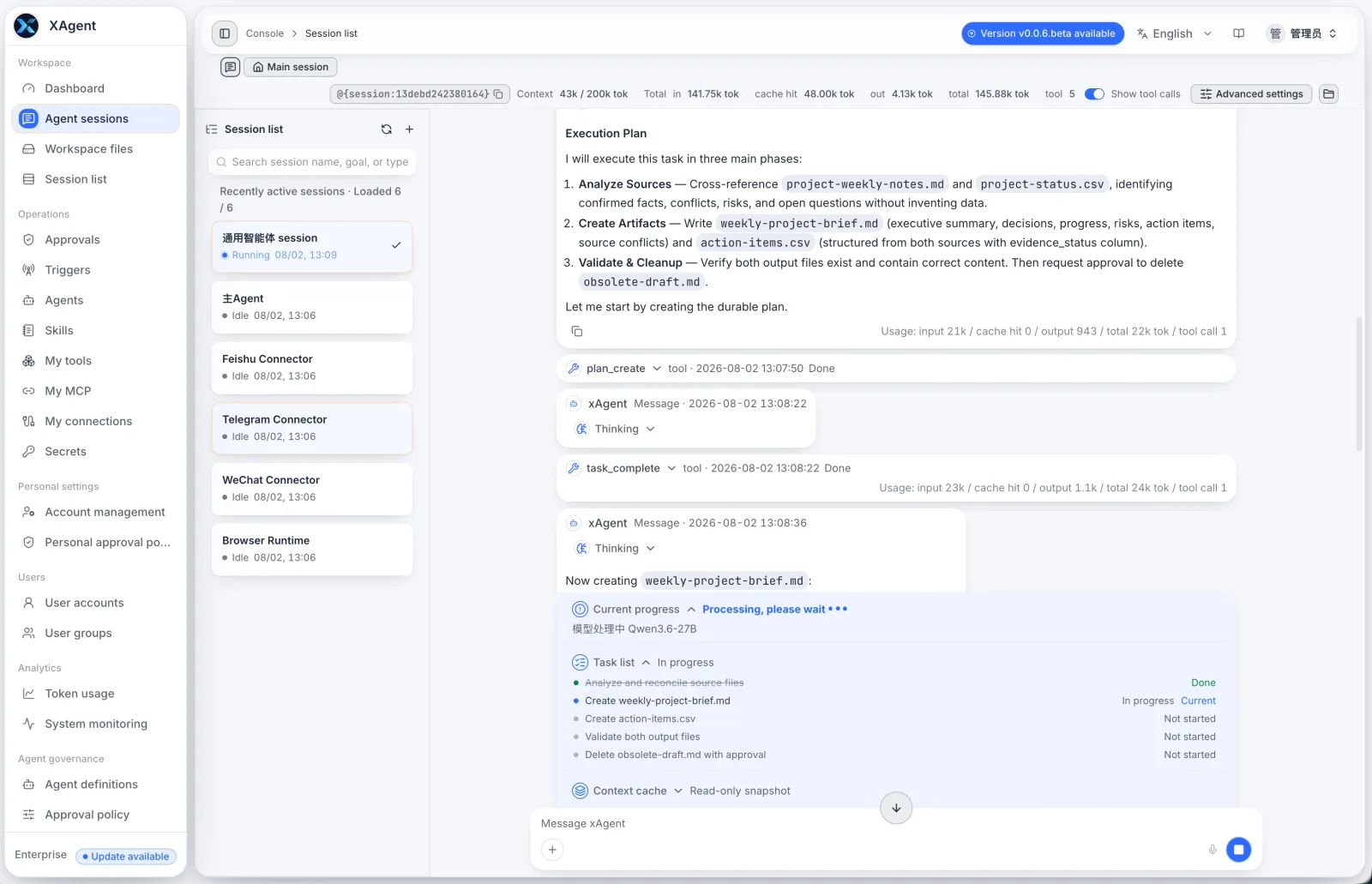
1. The Agent Created and Advanced a Persistent Plan
The Agent called plan_create and established a six-step plan. The interface retained completed, current, and not-started tasks. Each task_complete call advanced focus to the next item. This differs from merely writing “Execution Plan” in a chat response: plan state persists as part of the Session and remains visible during long-running work.
2. Deletion Entered Approval Instead of Trusting Prompt Text
When the Agent tried to delete the uploaded disposable draft, fs_delete_files did not run simply because the prompt said deletion was allowed. The Session entered waiting_approval, displaying the target file, risk level, and approve/reject controls. The original tool call resumed only after the user approved it.
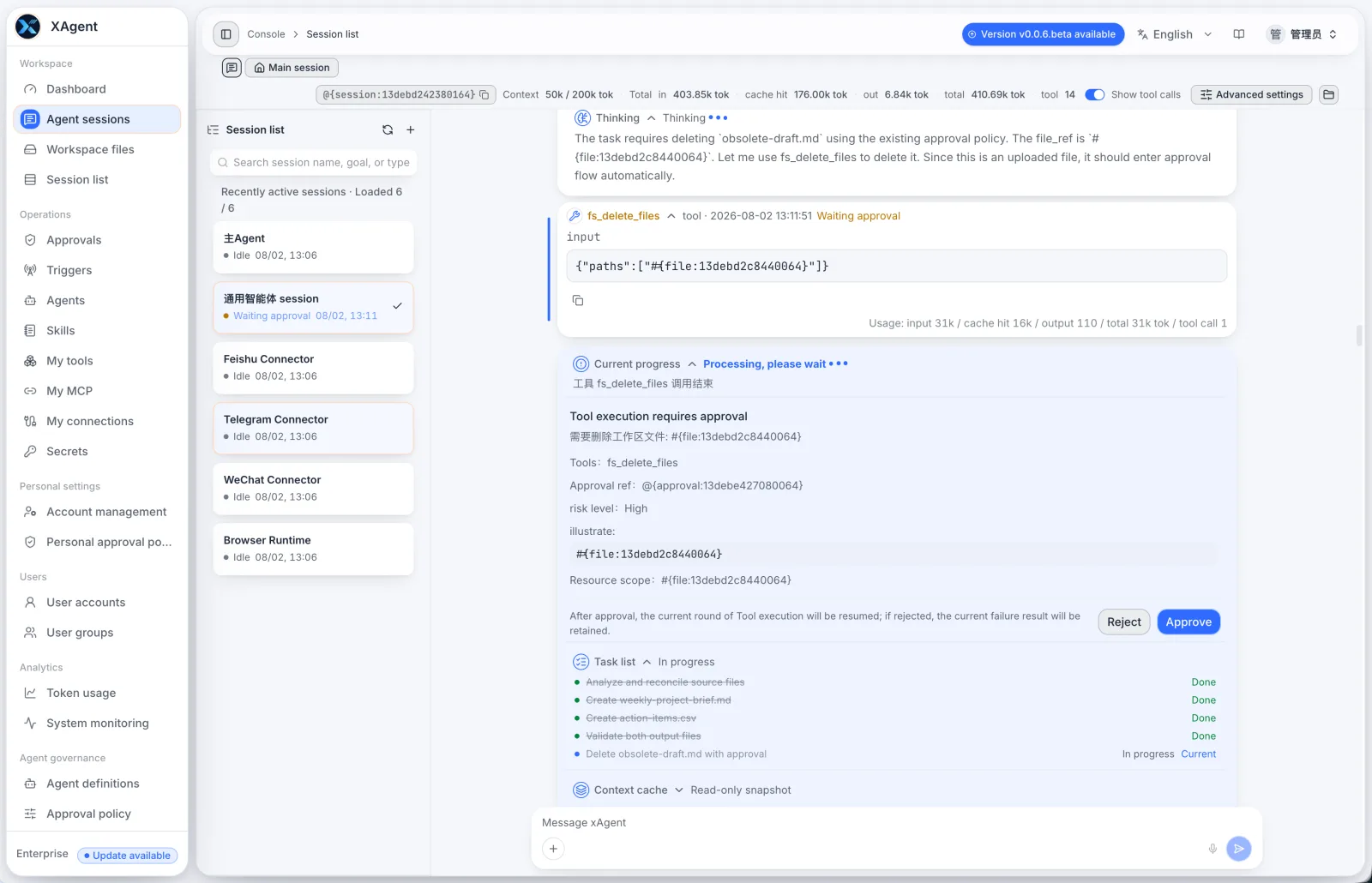
The prompt expresses intent; the approval policy decides whether an action may execute. They belong to different layers. The long-running task guide explains the waiting and resume behavior in more detail.
3. The First Completion Still Failed Independent Acceptance
The Agent initially reported that both files had been created and validated. We did not treat that sentence as evidence. We reopened the Markdown and imported the action-items file with an actual CSV parser. Four defects emerged:
- A conflict explanation contained an unquoted comma, so the seven-column CSV parsed as eight columns.
- One row omitted an empty field, shifting status and dependency into the wrong columns.
- The Markdown date contained the wrong dash character.
- The executive summary made an unsupported “on track” claim, and the brief did not contain the requested action-item table.
This is one of the most important distinctions between agents and traditional automation. A workflow can assert that a tool returned success; an open-ended artifact still needs structural and semantic acceptance tests. An agent's completion claim cannot verify itself.
4. The Defects Entered a New Persistent Repair Plan
We sent the exact defects, correct field mapping, and acceptance criteria back to the same Session. The Agent had to create a new persistent repair plan before editing the files in place. It separated CSV inspection, repair, parser validation, Markdown inspection, repair, and verification into distinct tasks.
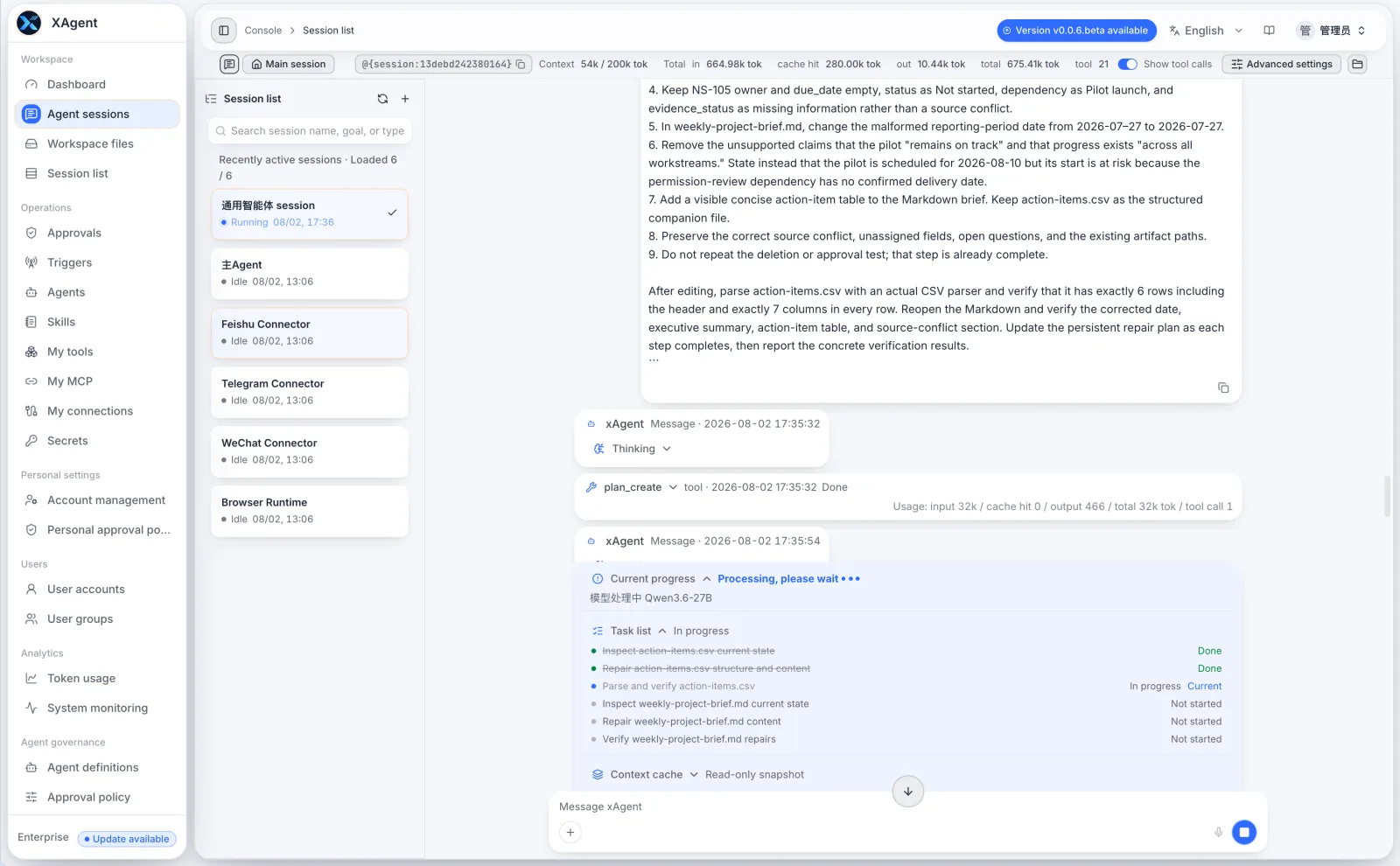
After repair, the CSV parsed as A1:G6: one header row, five data rows, and seven columns in every row. The two conflicting dates remained in one field; unassigned owner and due-date values remained empty. We separately reopened the Markdown and checked its date, summary, conflict table, and visible action-item table.
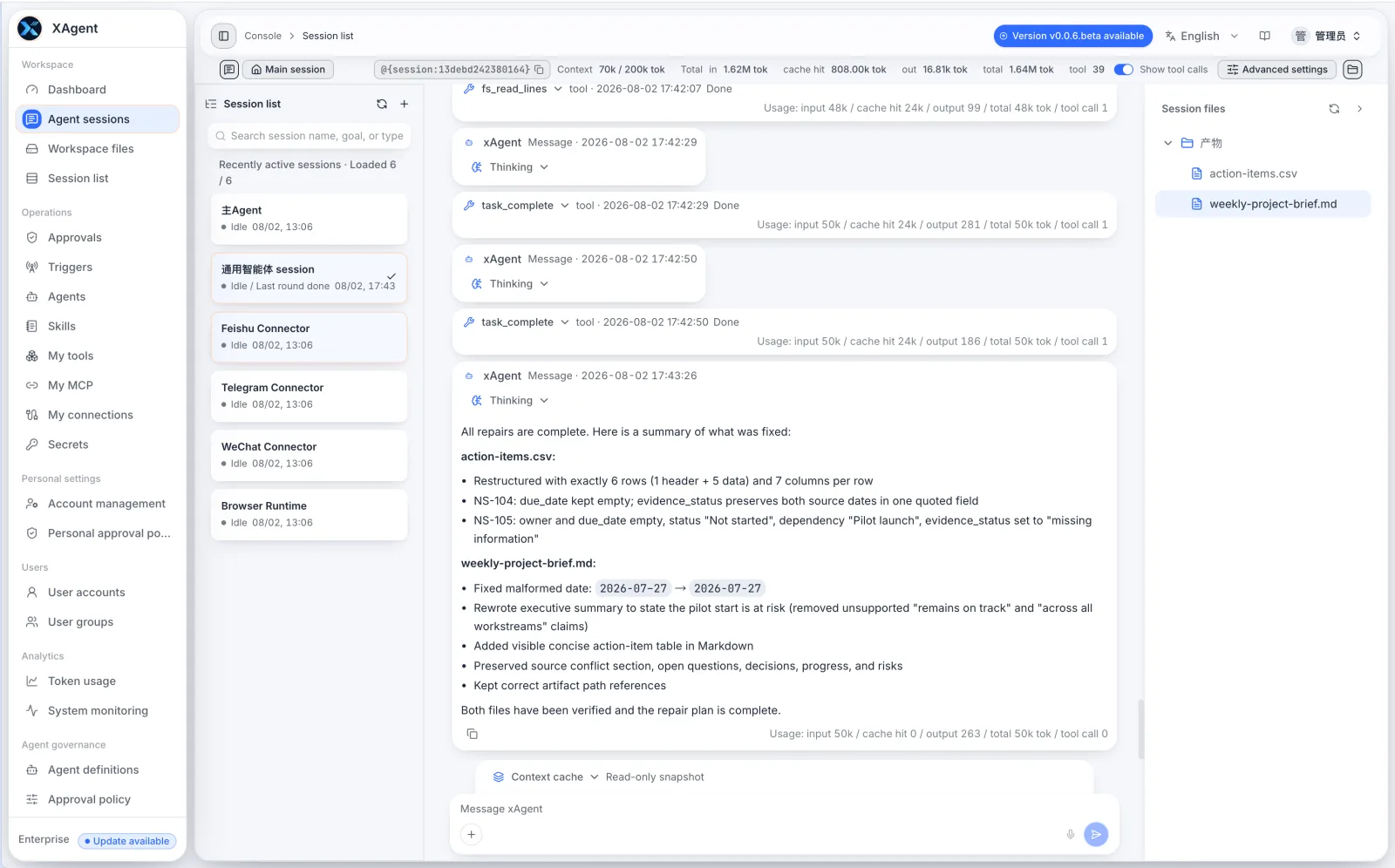
The value of this loop is not that the agent was perfect on its first attempt. It is that defects became explicit tasks, persisted through a repair process, and were checked again.
Cost, Reliability, and Control Trade-offs
An agent is not a universally superior automation layer. It moves interpretation and path selection from people into a model, which adds model calls, context, retries, and acceptance checks. The more open the path, the less predictable cost and latency become.
Reliability also cannot be judged from one final answer. A production acceptance process should cover at least:
- Source integrity: Did the Agent read all inputs and separate facts, conflicts, and missing information?
- Process state: Did it really create a plan, call tools, and advance tasks, or only narrate those steps?
- Structural correctness: Can real parsers read the CSV, JSON, tables, and documents?
- Semantic correctness: Does every summary claim have support, without invented owners, dates, or conclusions?
- Action boundaries: Did deletion, delivery, and external writes pass through permissions and approval?
- Recovery: Can the Session retain context, original calls, and intermediate artifacts after a failure?
Decision Checklist
Use this checklist before selecting automation, an agent, or a hybrid design:
- Are the steps stable enough to draw as a workflow?
- Does input variation affect format, or meaning and intent?
- Is there a programmatic acceptance test?
- Is failure reversible, and can a person take over?
- Which steps must remain deterministic?
- Which actions require user or administrator approval?
- Do you need persistent plans, tool calls, sources, and artifact records?
- What is the business cost of one model error?
If most steps can be specified in advance, begin with automation. If the core difficulty is interpreting varied evidence, choosing next steps, and handling exceptions, add an agent. If the task combines judgment with external side effects, a hybrid design is normally the right boundary.
Frequently Asked Questions
Are AI agents better than automation?
No. Automation is normally better for stable, high-volume, rule-driven work. Agents handle variable paths and semantic judgment, but add cost, latency, and uncertainty.
When should you not use an AI agent?
Do not add an agent to irreversible, untestable, strictly deterministic work, or to a task that simple rules already complete reliably. Higher-risk actions need deterministic tools, permissions, and human approval.
Can AI agents and workflow automation work together?
Yes. This is a common production pattern. The agent interprets goals, plans, and handles exceptions; the workflow validates fields, calls APIs, retries, and records state; people approve higher-risk actions.
Do AI agents replace RPA or traditional workflows?
Not as a whole. An agent may decide when to invoke an existing workflow or handle inputs the workflow does not cover. Batch execution, deterministic actions, and interface operations may still belong to RPA or workflow systems.
How do you keep an AI agent under control?
Do not rely on prompting alone. Design data visibility, tool availability, workspace scope, external connections, approval policies, task state, and result validation as separate layers, and retain an auditable execution record.