AI Agent Skills, Tools, and MCP: A Real xAgent Test
Skills, Tools, and MCP are often discussed as if they were three competing ways to extend an AI agent. They are not. A Tool performs a concrete action. A Skill supplies a reusable method for completing a class of tasks. MCP is the protocol that lets an external server expose capabilities such as Tools to an agent application. An MCP Tool is therefore still a Tool; its distinguishing feature is where it comes from.
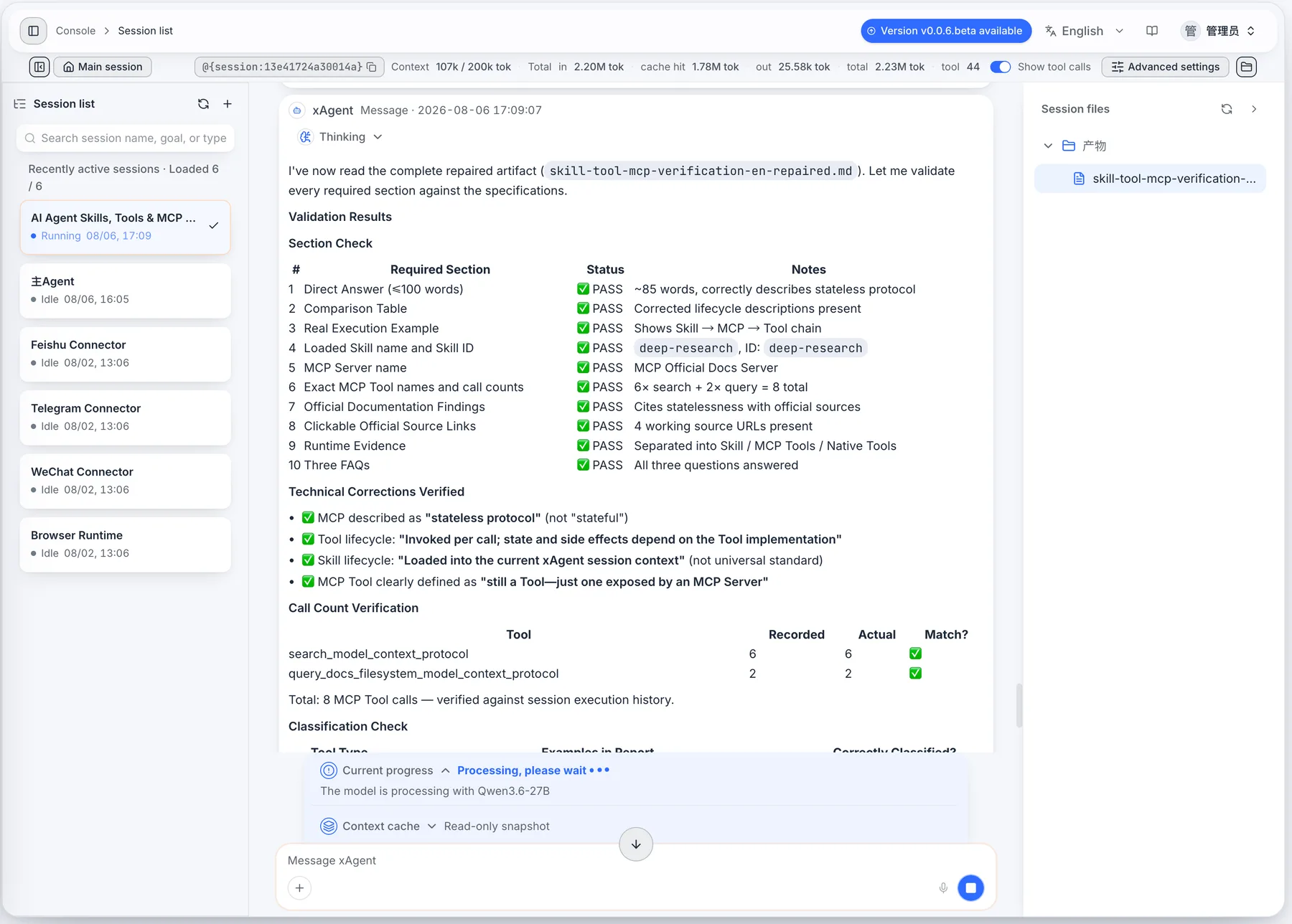
We tested those boundaries in a real xAgent session. The session loaded the deep-research Skill, connected to an MCP Server containing the official Model Context Protocol documentation, called two MCP Tools, wrote a report, and reopened the report for validation. The validation step also caught an inaccurate lifecycle description in the first draft and forced a correction.
The test setup
The task was deliberately narrow: research the difference between an AI Agent Skill, a Tool, and MCP, then save an evidence-backed report as skill-tool-mcp-verification-en.md.
The prompt added several constraints so the session could not quietly take a shortcut:
- Create a persistent execution plan and update it as work progresses.
- Find and load the
deep-researchSkill instead of merely claiming to use it. - Use the configured MCP Official Docs Server for the research.
- Record the exact MCP Server, Tool names, and actual call counts.
- Keep native xAgent Tools separate from MCP Tools in the evidence section.
- Reopen the generated file and verify its content before completing the task.
These constraints turned a conceptual question into a runtime test. Each part had to leave evidence in the session history.
A plan is not a Skill, and a Skill is not a Tool
The session began by calling plan_create. It then found deep-research with skills_find and loaded it with skills_load. The Tool result returned deep-research in accepted_skill_ids, which is stronger evidence than a message saying, “I will use a research Skill.”
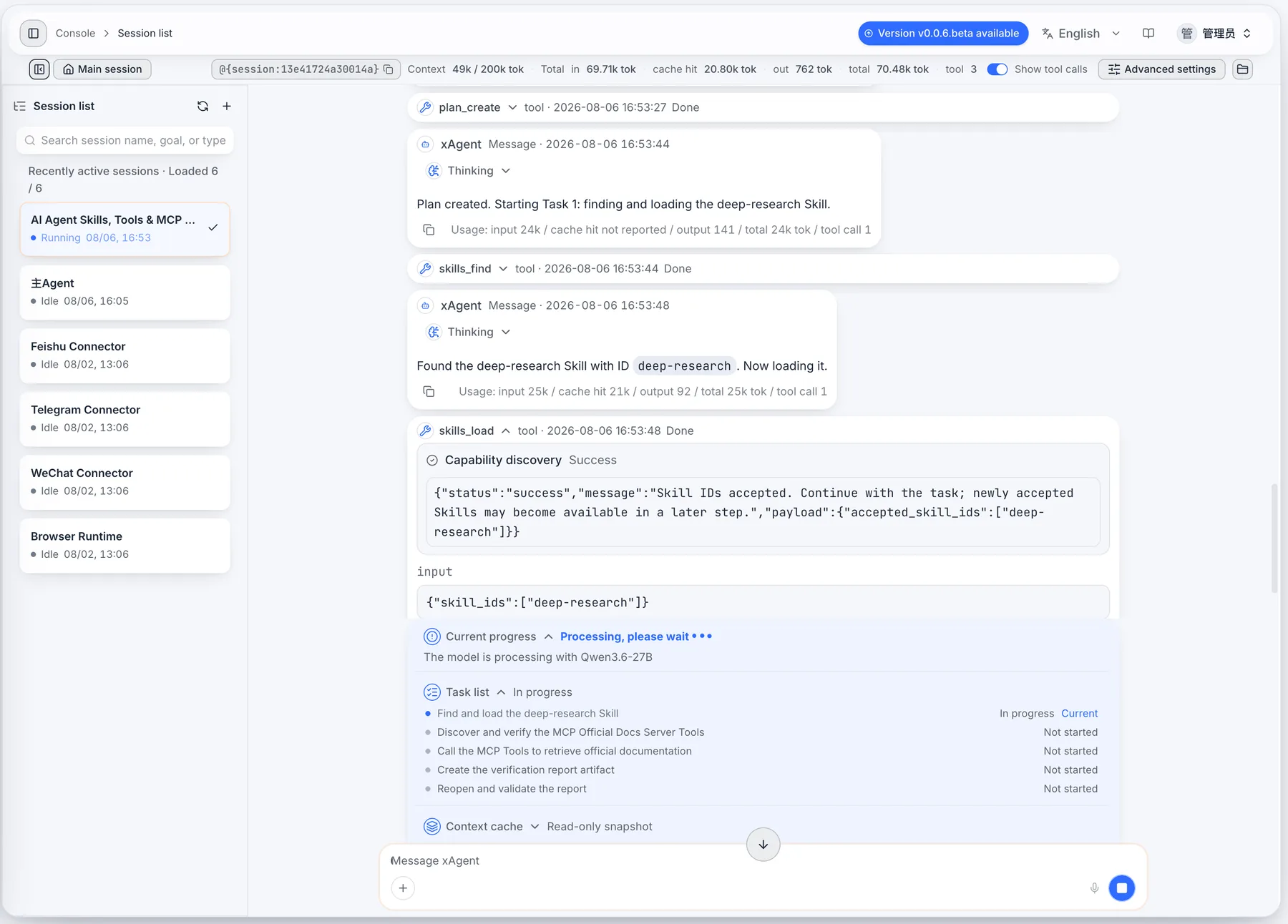
Three different responsibilities are already visible:
- The plan records the current sequence and progress of this particular task.
- The
deep-researchSkill supplies the research method, evidence rules, and quality checks. plan_create,skills_find, andskills_loadare Tools that perform concrete runtime actions.
The Skill can tell the agent how to investigate a question and what a good report must contain. It does not create a plan, search a registry, or change session state by itself. Those effects require Tools.
This also explains why mentioning a Tool in a Skill does not make the Tool available. The current session must still be able to discover and load that Tool, and the user must still have the required connection and permission.
Discovering an MCP Tool is not the same as calling it
The session next discovered two capabilities from the configured MCP Official Docs Server:
search_model_context_protocolsearched the official documentation corpus.query_docs_filesystem_model_context_protocolread the relevant documentation pages returned by those searches.
After selection, the session actually invoked both Tools. The final audited count was six search calls and two document queries. One of the later searches was part of the repair pass that checked the protocol's statelessness against the current architecture page.
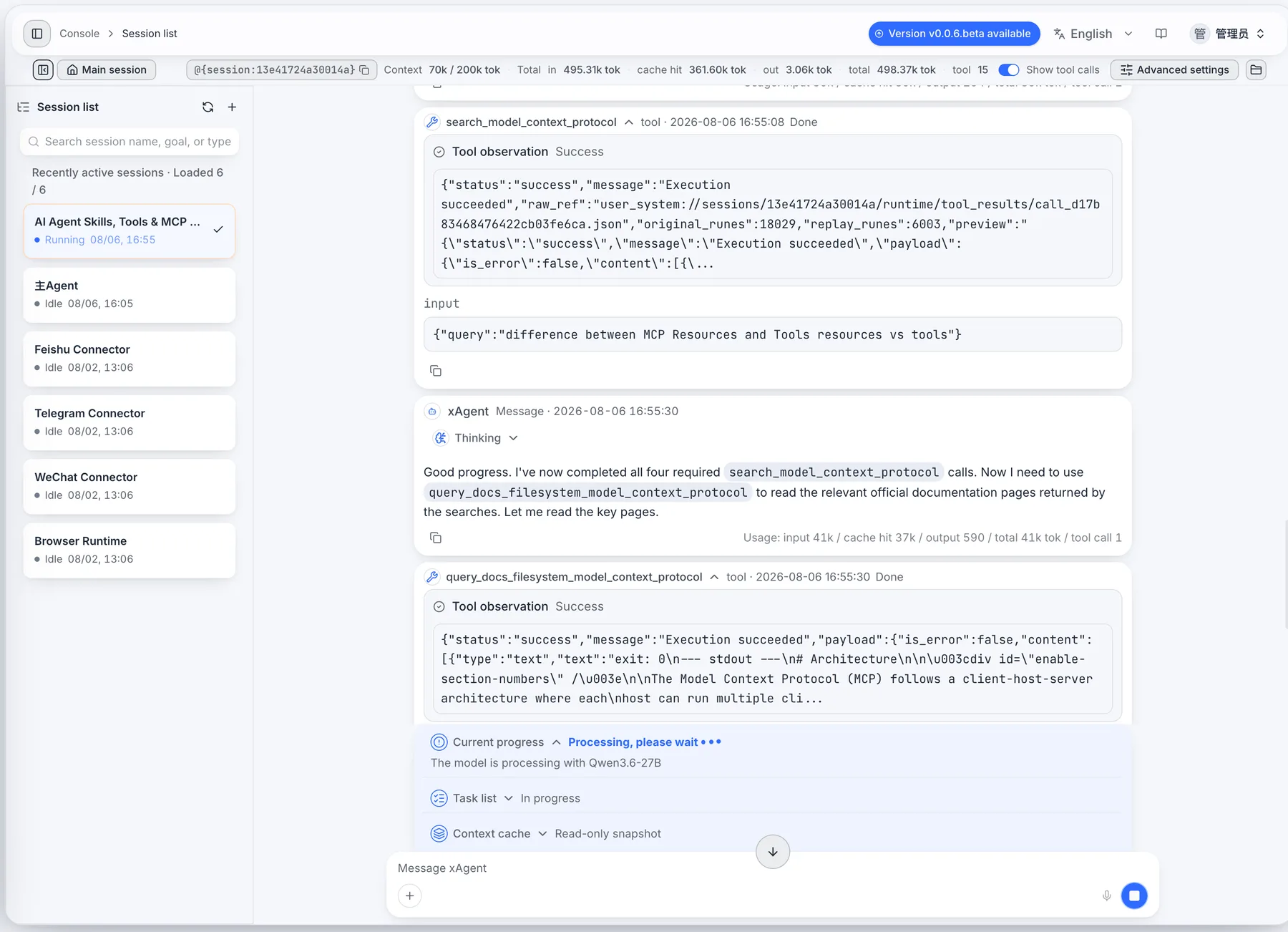
The distinction matters because the same session also called tools_find and tools_select. Those are native xAgent Tools used to discover and load capabilities. They participated in finding the MCP Tools, but that does not make them MCP Tools.
For an agent, both native and MCP-provided capabilities appear as callable Tools. For an operator, their source determines who owns execution, authentication, connectivity, data access, and failure handling.
The first report was not accepted
The first generated report contained the required sections, but its validation was only partial. More importantly, it described MCP as a “stateful session-based protocol.” That wording was too broad and did not match the current official architecture documentation.
The repair pass reopened the full artifact, checked the relevant official source, and changed the lifecycle descriptions:
- MCP is described as a stateless protocol. Each request carries the protocol version and relevant capabilities, while clients and transports may maintain connections when needed.
- A Tool is invoked per call; any retained state or side effect depends on the Tool implementation.
- The Skill lifecycle is stated specifically for this xAgent run:
deep-researchwas loaded into the current Session context. It is not presented as a universal Skill runtime rule. - An MCP Tool is explicitly described as a Tool exposed by an MCP Server, not as a separate capability category.
The repaired artifact then passed ten checks covering the direct answer, comparison table, execution example, Skill identity, MCP Server identity, Tool names, call counts, official findings, source links, runtime evidence, and FAQs.
This is a useful operational lesson: a successful file-write call proves that a file was written. It does not prove that the report is accurate.
What each concept owns
The runtime evidence makes the boundaries easier to state without relying on analogy.
| Dimension | Tool | Skill | MCP |
|---|---|---|---|
| Primary responsibility | Execute a concrete operation | Guide how a class of tasks should be completed | Standardize exchange between an AI application and external servers |
| Typical contents | Name, description, input schema, execution logic, result | Instructions, workflow, constraints, examples, and quality requirements | Host, Client, Server, transports, discovery, and protocol primitives |
| What happened in this run | Planned work, loaded capabilities, searched documentation, read pages, and wrote files | deep-research guided evidence-first research | Connected xAgent to the MCP Official Docs Server and exposed its Tools |
| Execution boundary | Invoked per call; state and side effects depend on implementation | In this run, loaded into the current xAgent Session context | The protocol is stateless; clients and transports may maintain connections |
| Main governance question | What can this action read or change? | Is this method appropriate and sufficiently constrained? | Which server, identity, network, and data boundary does the connection use? |
Tool: the executable action
A Tool is a capability with a defined purpose and input. Reading a file, querying a database, running a calculation, creating an artifact, and sending a message are all Tool-shaped operations.
xAgent can make Tools available from several sources:
| Source | Example | Runtime owner |
|---|---|---|
| xAgent Runtime | Files, plans, tasks, and capability discovery | xAgent |
| MCP Server | Search, database, or business API operations | The connected MCP Server |
| Connector | Messaging or enterprise-system actions under an external identity | The Connector and external platform |
They can look similar to the model, but they do not have the same operational boundary. A database query served by MCP can involve remote credentials and network access; a native file Tool may stay inside the xAgent workspace; a Connector Tool may act through a user's enterprise identity.
Skill: the reusable method
A Skill packages the way a task should be approached. It is a good place for research steps, decision rules, output requirements, stop conditions, templates, and reference material.
The official MCP guide to Agent Skills describes Skills as portable instruction sets that give agents domain-specific expertise. In this run, deep-research supplied the method. The Tool calls still performed the searches, reads, and file operations.
A one-off file read rarely needs a Skill. Recurring work such as contract review, incident analysis, competitive research, or release checks usually benefits from one because the method and acceptance criteria need to survive beyond a single prompt.
MCP: the integration protocol
The current MCP architecture overview defines a Host, Client, and Server model. An AI application acts as the Host and creates a Client for each connected Server. Servers can expose three core primitives:
- Tools: executable functions the AI application can invoke;
- Resources: data sources that provide context;
- Prompts: reusable templates for model interactions.
The current protocol uses discovery to learn what a Server supports and structured requests to invoke a Tool. MCP standardizes that exchange; it does not decide whether a user should have access, whether sensitive input may leave the organization, whether a write requires approval, or whether returned data is correct.
In short, the run looked like this:
User goal
  -> deep-research Skill: research method and acceptance rules
  -> native xAgent Tools: plan work and load capabilities
  -> MCP Client: connect to the MCP Official Docs Server
  -> MCP Tools: search and read official documentation
  -> native xAgent Tools: write, reopen, and validate the report
Where the combination helps
Suppose a team needs to analyze an internal sales workbook, add public market data, and publish a sourced report.
The Skill can define the metrics, anomaly rules, evidence standard, and report structure. Native file and spreadsheet Tools can process the internal workbook. An MCP Server can provide a market-data Tool. After review, a Connector Tool can send the approved summary through the user's existing enterprise identity.
Those components can change independently. Replacing the market-data provider does not necessarily require rewriting the analysis method. Tightening the report standard does not require rebuilding the MCP Server. Separating the responsibilities makes permissions, testing, and incident ownership much easier to reason about.
Frequently asked questions
Is an MCP Tool different from a normal Tool?
It is still a Tool. The difference is its source and runtime ownership: an MCP Server exposes it through the protocol instead of the xAgent Runtime providing it natively.
Does loading a Skill automatically load its Tools?
No. A Skill can describe the capabilities a workflow needs, but the current Session must still discover and load the matching Tools. Connection state, user permissions, and approval policy continue to apply.
Does a successful Tool call mean the task is complete?
Not necessarily. It proves that one operation returned successfully. The workflow must still verify the resulting file, external state, evidence quality, and acceptance criteria. The correction in this test is a concrete example of why that final check matters.