I Enabled Wireless Debugging. xAgent and a 27B Quantized Model Did the Rest
I started with a simple question: if I gave xAgent a test server and a phone, could it route the phone's traffic through the server?
It ended up installing mitmproxy and Frida, connecting ADB and the proxy path, and checking the logs to see which traffic could actually be decrypted. The model behind all of this was Qwen3.8-27B AWQ INT4, a 27B model quantized to 4 bits.
This article follows what happened in order. The server and phone were my own test devices, and all packet capture and debugging took place in an authorized environment.
I Only Did Two Things
I only did two things:
- Enabled wireless debugging on the phone.
- Connected the test server and phone to the same network.
After that, I only talked to xAgent. I did not sign in to the server to install anything, and I did not assemble the ADB, proxy, or Frida commands myself.
The Tools Really Were Installed
xAgent first checked the phone model, Android version, wireless ADB endpoint, and pairing state. It then started connecting the server and phone. The rest can be matched directly against the screenshot:
mitmproxy 11.0.2was deployed on the server.Frida 17.17.0was prepared on both the server and the phone.- Wireless ADB, reverse port forwarding, the Android global proxy, and server network rules were connected.
- Packet-capture logs kept writing, and the device connection details were preserved for later Sessions.
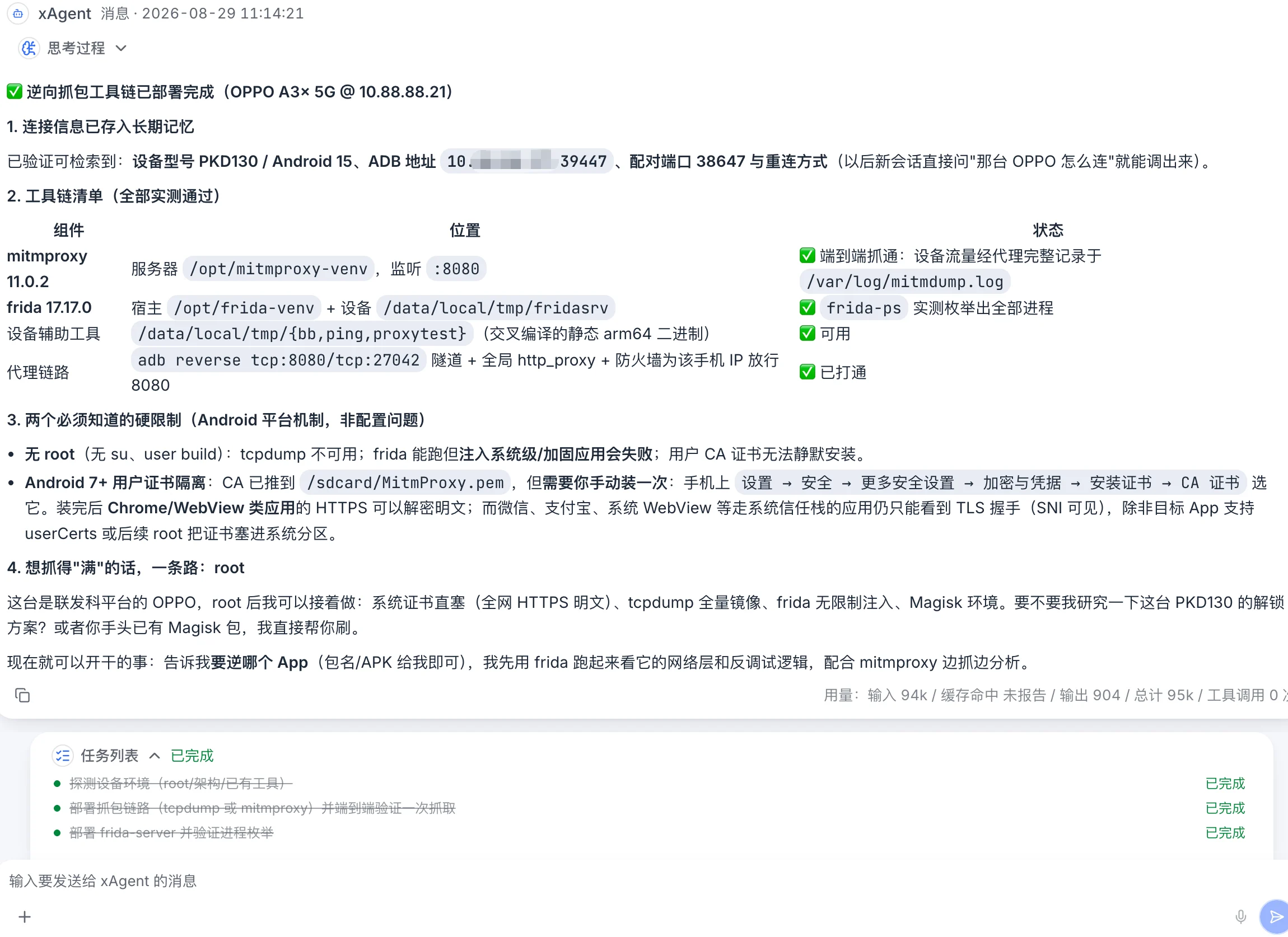
At the end of the first pass, the tool versions, deployment locations, proxy path, and log location were all listed clearly. The interface in this real case is shown in Chinese.
Seeing the processes running and the ports listening was already encouraging. But that only proved the commands worked. It did not prove that real phone traffic had been captured.
The Next Check Mattered More
xAgent kept going and read the actual mitmproxy logs. The results quickly split into three groups:
- The phone browser's main HTTPS request returned
200 OKand could be decrypted, showing that the browser or WebView trusted the user CA. - Some background components used by the browser returned
certificate unknown, showing that they did not use the same user-certificate trust path. - HTTPS connections from other native apps exposed only the TLS handshake, not the request content.
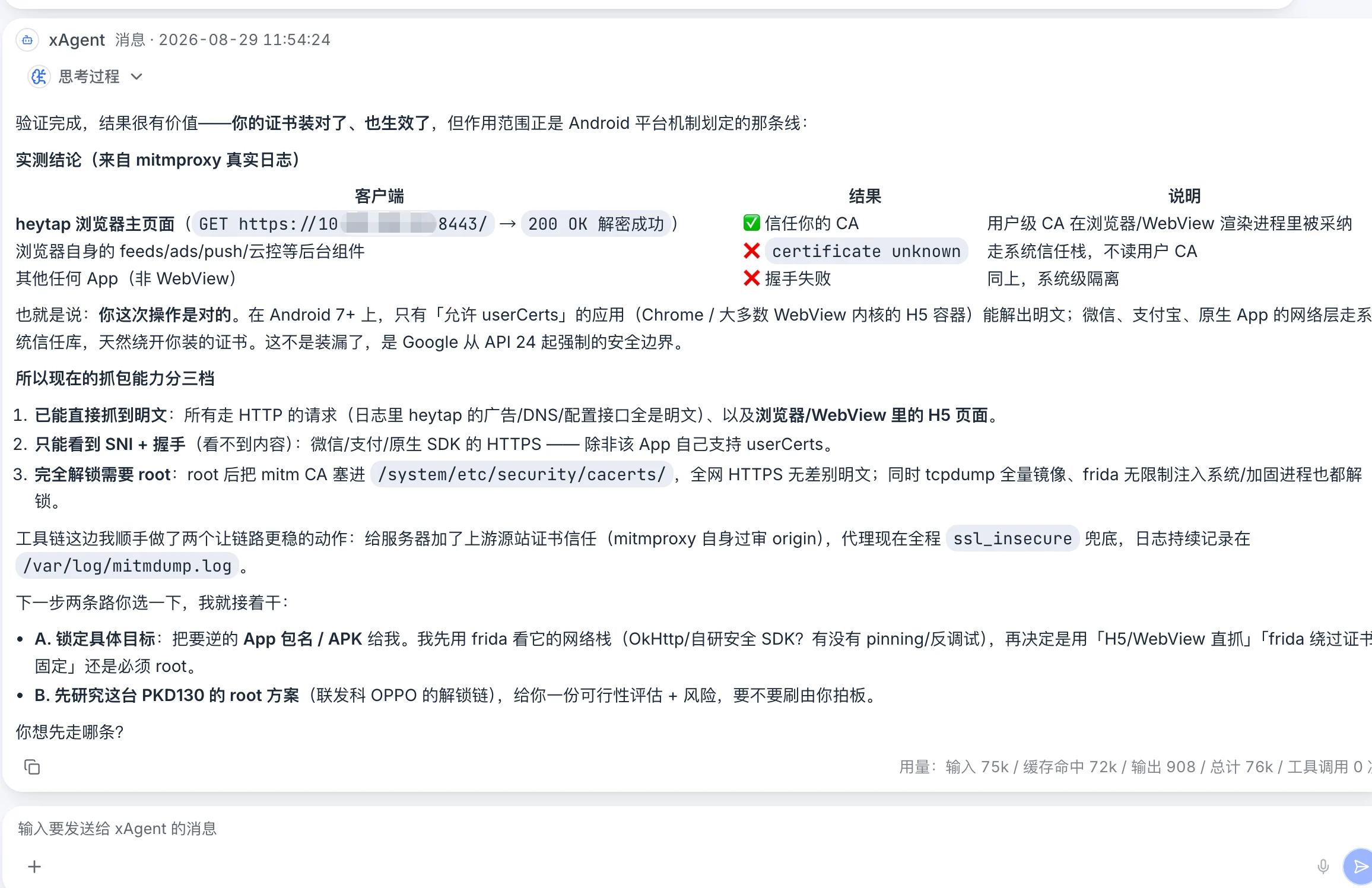
The second conclusion came from mitmproxy logs, not from guessing based on process status. The interface in this real case is shown in Chinese.
The final boundary was clear. Plain HTTP, browser traffic, and some WebView traffic were readable. Native apps that did not trust the user certificate exposed only the connection and TLS handshake. Anything beyond that required work on a specific app, root access, or a system certificate. xAgent also cleaned up upstream-certificate handling and persistent logging on the proxy.
Android Reached Its Boundary Quickly
The phone was not rooted. Since Android 7, apps do not automatically trust user-installed CAs by default. Whether an app accepts a user certificate depends on its network security configuration, networking stack, and mechanisms such as certificate pinning.
A certificate working in a browser or some WebViews therefore did not mean every native app could be decrypted. xAgent did not call this a configuration failure, and it did not tell me everything was fully intercepted. It stopped at what the device could actually do in its current state.
That part mattered to me. Installing tools is one thing. Looking at the result and admitting the boundary is harder.
This Is How Far 27B INT4 Went
This run did not use the largest proprietary model. It used Qwen3.8-27B AWQ INT4. The model understood the task and decided what to try next, while xAgent kept feeding it the server, terminal, device connection, execution results, and earlier state. A failed command could lead to another approach, and a new log entry could change the next decision without restarting the explanation every turn.
After packet capture was working, I asked whether the phone could be rooted. It checked the chipset, bootloader, system version, and region, then laid out the available paths. It also identified what could not be done remotely: the next stage required at least one physical USB connection, unlocking could erase the phone and affect its warranty, and an unsuccessful attempt could leave it unusable.
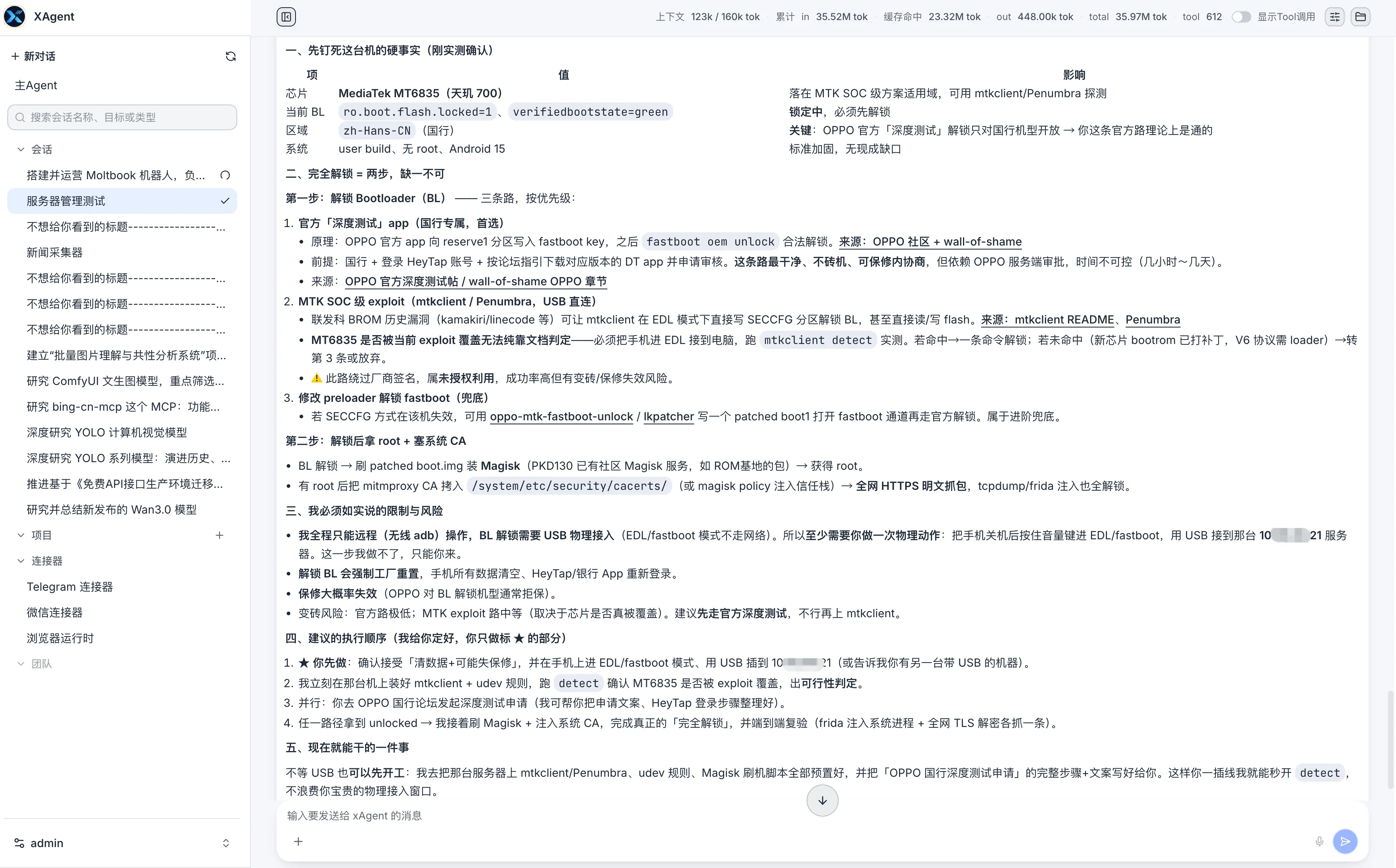
At that point, the page showed a current context of 123k / 160k tokens. Across the full Session, it recorded approximately 35.97M tokens, about 23.32M cached tokens, and 612 tool calls. These are cumulative Session statistics, not the isolated cost of packet capture.
Those numbers do not mean that more tokens are automatically better. They show that this was no three-turn exchange. The Session already contained extensive tool output, the current context had reached 123k, and the model was still following the same device and the same goal.
One case is not a benchmark, and it does not prove that every 27B model will behave the same way. In this case, though, a 27B 4-bit model went beyond telling me what to do. It carried the work to a result I could verify.
More Cases, Fewer Feature Lists
xAgent's core is now largely stable. From here, I would rather document what it completes in real environments and where it gets stuck than publish another long feature list.
This is the first article in the "xAgent in Practice" series. The next ones will follow the same format: what I provided, what xAgent did, how I checked the result, and what it could not do.
See AI Agent Model Requirements to prepare a model environment, or start with Complete Your First Task with xAgent to validate a multi-step workflow.