xAgent 0.0.8.beta Is Available: Incremental Backup, Disaster Recovery, and Cloud Storage
xAgent 0.0.8.beta is now available. This release extends storage governance beyond where files live to how data is backed up, how an instance recovers after a failure, and how external storage is made available to users. It also improves file reuse in sessions, multilingual Skill governance, and local storage cleanup.
The headline change is online incremental backup. Backup jobs can run while xAgent is serving users, and restore data can be downloaded and verified online. Only the final data-directory cutover requires downtime.
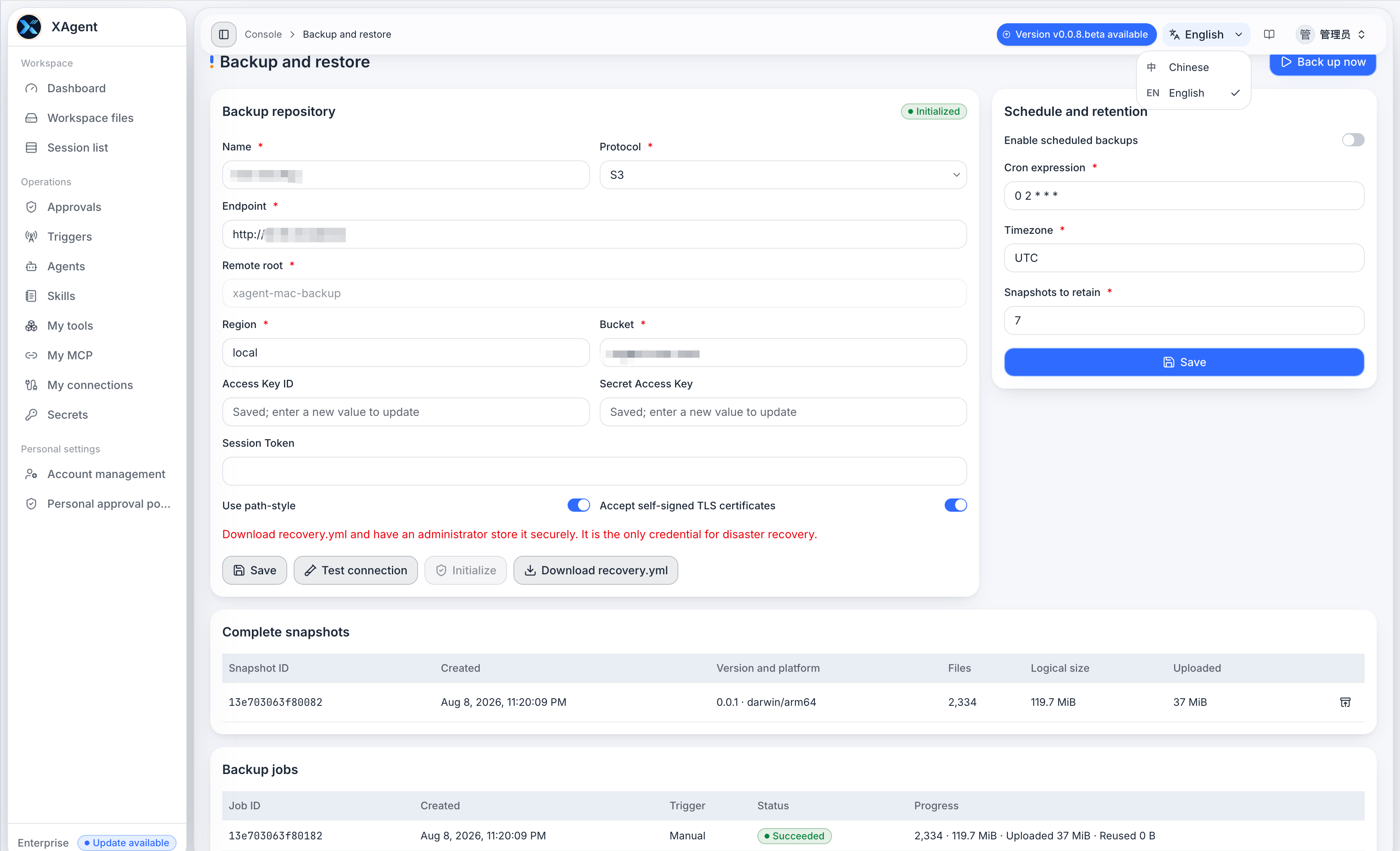
Online Incremental Backup and Disaster Recovery
Administrators can configure S3, an S3-compatible object store, or WebDAV as a backup repository, test the connection, and initialize the repository before use. Backups can run manually or on a schedule with a Cron expression, an IANA time zone, and a snapshot retention limit.
Each completed snapshot represents a complete data directory from the restore point of view. In the repository, xAgent stores content-addressed objects and uploads only new or changed content. Data is encrypted before it leaves the machine, combining straightforward full-snapshot recovery with lower remote storage and transfer costs.
Restore has two phases. xAgent first downloads, verifies, and reconstructs the selected or latest snapshot while the current instance can remain online. The operator then stops xAgent and performs the directory cutover. After restart, a successful validation ends with cleanup; a failed validation can roll back to the previous directory. A self-contained recovery.yml makes it possible to list snapshots and prepare a restore even when the original database is unavailable.
For the complete procedure and command reference, see How xAgent Backup and Disaster Recovery Work.
S3 and WebDAV in Public Files
S3, S3-compatible storage, and WebDAV can now be mounted into Public Files. Each integration uses its own prefix. Administrators can create directories and upload files, while authorized users can browse, preview, and download content under the existing user and group ACL model.
S3 integrations support the default credential chain, static credentials, and path-style addressing. WebDAV uses a username and password. Static credentials are stored encrypted. An integration can skip TLS certificate verification for a controlled internal service using a self-signed certificate, but only after its network and certificate boundaries are understood.
If a remote integration is unavailable, xAgent keeps the entry visible and marks it unavailable instead of presenting it as an empty directory.
Reuse Existing Files in Sessions
The message composer can attach files that the current user can already see in Workspace or Public Files, including files stored through an S3 or WebDAV integration. Users no longer need to download a file and upload the same bytes again.
The import path uses the same file type, size, model capability, and session-state checks as a local upload. A failed import leaves no invalid attachment. Remote public files are processed into model-readable content only when a task needs them; the original remains in the external store.
Skill, Connector, and Production Capability Governance
Skill lists, search results, and runtime capabilities are projected in the current response language. English environments can create English Skills, while the canonical Skill name now comes from SKILL.md across the UI, sessions, and runtime.
Connector cards use the actual service-declared version and validate their associated Skill IDs. Production mode hides development-only Tool administration pages and mutation APIs without changing Tool selection in sessions and Agents, approval policies, or personal MCP integrations.
Local Storage Cleanup
Background cleanup now watches both disk space and inode usage. At the normal watermark, it follows retention periods. At the high watermark, it more aggressively reclaims expired backup staging data, terminal diagnostics, session temporary files, failed Runtime Assets staging, and unreferenced file content.
The boundary remains strict: formal user data is never deleted merely because it is old. Active jobs, pending queues, delivering events, and referenced files are excluded. Cleanup owners are isolated so one failed cleanup does not stop the others, and failed work is retried later.
Upgrading from 0.0.7.beta
Starting with 0.0.8.beta, formal xAgent file storage is fixed to the local data directory. If an older installation stores formal files in S3, the upgrade validates ownership and integrity before migrating those objects back to local storage. The old configuration is removed only after the whole migration succeeds. If the remote store is inaccessible or integrity checks fail, startup stops and preserves the original configuration.
S3 and WebDAV are now cloud storage integrations under Public Files, not formal file-storage Providers. Before upgrading, continue to back up configuration, the database, Workspaces, Memory, Skills, Tool packages, and Connector state.
After initializing a backup repository, download the latest recovery.yml immediately and store it offline. It contains sensitive information required to access and decrypt the repository and must not be committed to source control or placed in ordinary shared storage. Third-party cloud content mounted under Public Files is not copied into xAgent backups; protect it with the provider's own versioning, replication, or backup policy.
See Start Installation for installation and upgrade steps, and the Changelog for the release summary.