Route Sensitive AI Agent Work to an Internal LLM by Agent and Session
An organization does not need to choose between running every task on an internal model and sending every task to a third-party API. xAgent can create an Agent for sensitive work that defaults to an internal model, then let its Sessions use the matching model configuration: general work can use an external model, while restricted work starts with a model configuration that points to an internal service. The model configuration selects the final Provider, so the two workloads use separate model paths.
This is a specific way to configure an Agent around a data boundary. It complements the general Agent Management workflow; it is not, by itself, an absolute claim that every byte of data stays inside the company. This article explains how to establish the boundary, verify it, and understand what else must be controlled.
Do Not Put Every Task on One Model Path
Most teams have two kinds of work:
- Everyday writing, public research, and general coding assistance can benefit from the scale and capabilities of third-party LLM APIs.
- Contracts, customer material, operating data, and unreleased plans may need model requests to reach only a model service controlled by the company.
With one default model, people must remember what may be sent to an external Provider. That is error-prone and makes it difficult to give different jobs the right capability set.
A more maintainable pattern is to prepare separate model configurations and Agent entry points for separate task boundaries:
| Task entry point | Selected model configuration | Final Provider path | Appropriate material |
|---|---|---|---|
| General research Agent | general-external | Third-party LLM API | Public information and routine non-sensitive work |
| Confidential-material Agent | confidential-internal | Self-hosted model or internal model gateway | Restricted business material |
| One-off sensitive Session | confidential-internal | Self-hosted model or internal model gateway | A single confidential analysis |
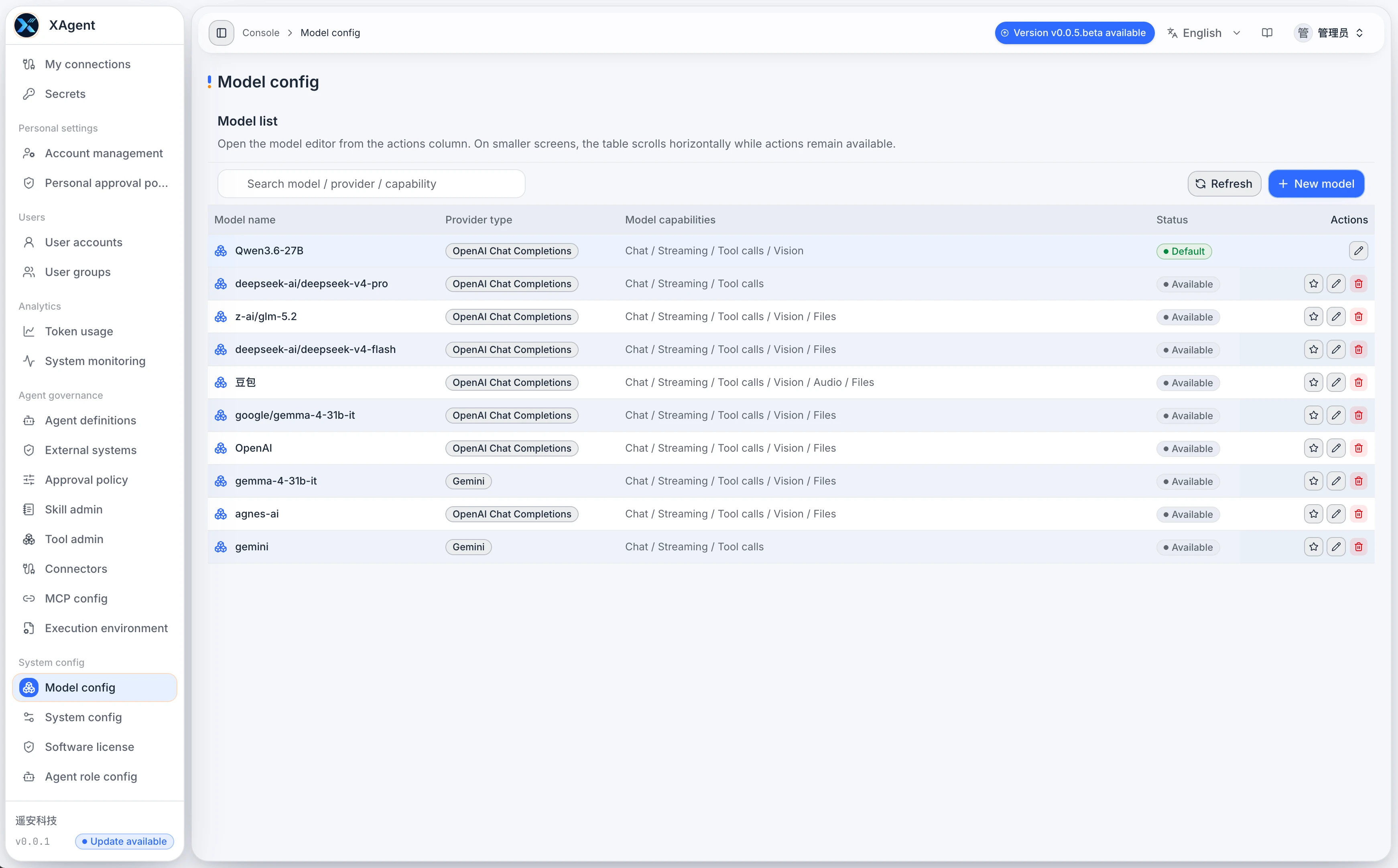
The names are only examples. What matters is that each model configuration maps to an explicit Provider type, Base URL, credential, real model name, and capability declaration.
How Three Configuration Layers Create a Provider Route
Agents and Sessions in xAgent do not store a raw Provider URL or API key. They select a model configuration name, and the server resolves that name to the matching Provider client. Credentials and network addresses therefore remain in administrator-managed configuration instead of appearing in Agent prompts or conversation content.
| Layer | What it stores | Responsibility |
|---|---|---|
| Model configuration | Model name, Provider type, Base URL, key, capabilities, and default policy | Defines where model requests go and what the model can do |
| Agent definition | Role, Skills, Tools, and a default model configuration | Provides a reusable capability and routing baseline for a business task |
| Session | The current model configuration and Session-level policy | Keeps one concrete task on its selected path for later model requests |
When a Session is created from an Agent that has a model configuration, xAgent expands that configuration into the new Session's runtime metadata. Later model requests use the Session's current model configuration. A Session can also select a model configuration independently, which is useful for a one-off confidential task that does not justify a new Agent.
This allows capability isolation and model-path isolation to be designed together. A confidential-material Agent can use an internal model by default and expose only the Skills and Tools needed for that job, while a general Agent can retain an external model and its own working capabilities.
A Configuration Flow You Can Review
1. Configure Two Model Classes Instead of Replacing the Default
Prepare at least one general model configuration and one internal model configuration. The internal model can point to a company-operated OpenAI-compatible service, a private model gateway, or another Provider controlled by the organization.
Test both connections and accurately declare chat, file, vision, streaming, and Tool-calling capabilities. Capability switches must describe the real model; turning them all on for convenience produces unreliable tasks.
See Model Configuration and Model Requirements for the fields and connection checks. If the server, HTTPS, access controls, and runtime environment are not ready, first complete self-hosted AI Agent deployment.
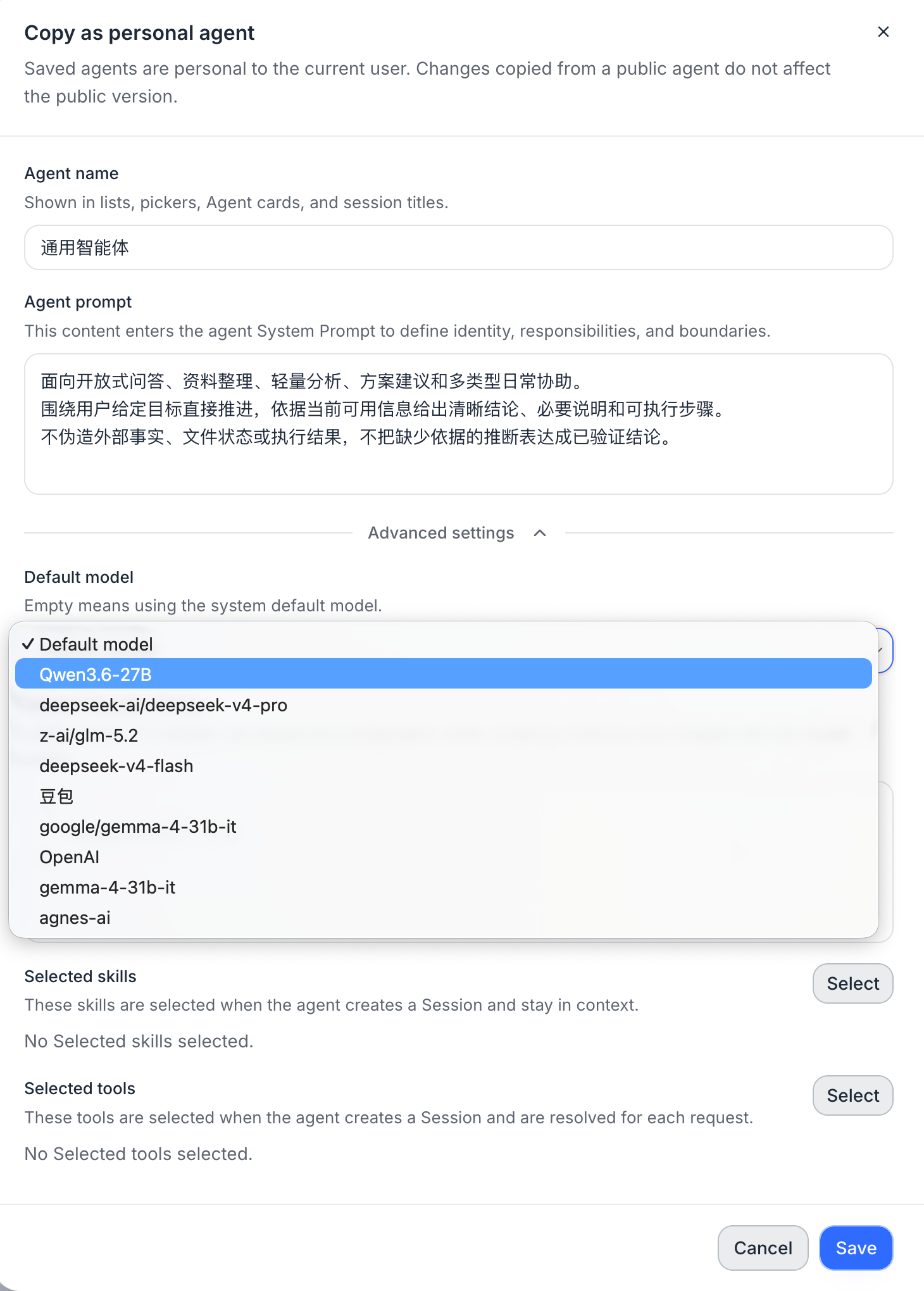
2. Create a Dedicated Agent for Restricted Work
When creating a confidential-material Agent, define at least four things:
- Choose the internal model configuration as its default.
- Bound the business scope and expected output in its role instructions.
- Attach only the Skills and Tools required for the task.
- Do not put passwords, API keys, or raw confidential material in the Agent description.
This turns “which model should I use for sensitive material?” from a one-off user decision into a reusable task entry point. See Agent Management for how entries, personal scope, and public scope are managed.
3. Keep a Task-Level Choice at the Session Layer
Session-level model selection is useful when:
- A general Agent needs to handle one restricted item, so the new Session starts with the internal model configuration.
- A later stage of a task genuinely needs a different model capability, after the material boundary has been reviewed.
A model switch takes effect on later model requests. It does not rewrite a request already sent to a model or a Tool call already completed. See how models, Skills, and prompts switch during a task for that runtime boundary.
Verify the Runtime Route, Not Just the Configuration Screen
An "internal" label in the configuration screen is not proof that routing is correct. Before release, run an auditable test with material that contains no real sensitive information:
- Create a new Session with the confidential-material Agent and submit material containing a unique test marker.
- Confirm the model configuration actually used by the Session in xAgent runtime records.
- Confirm that the internal model gateway or self-hosted model service received a request with the same test marker.
- Inspect the external Provider gateway, egress proxy, or firewall logs and confirm that no matching request appears.
- Repeat the test for attachment handling, Tool calls, sub-sessions, and follow-up prompts, not just the first chat turn.
Record the test time, Session ID, model configuration name, internal gateway request ID, and network-audit result. This proves which route a real task used instead of merely describing which route it should have used.
The Current Boundary: Default Routing Is Not Enforced Data Residency
This distinction matters. An Agent's model configuration is carried into a newly created Session as its default, and the Session can adjust the model for later work through Advanced Settings. Agent- or Session-level selection therefore establishes clear default Provider paths, but it does not alone prove that a user can never move a task to an external model.
An internal Provider for model requests also does not mean that all data automatically stays inside the company:
- MCP servers, Tools, Connectors, or network requests can send arguments and results to external systems.
- File-capable models may upload files to the selected Provider, and the internal model service itself must be inside a controlled network.
- Other system roles, automated tasks, and integrations need their own model and network review.
- Approval decides whether xAgent performs an action; it does not replace external-system permissions or corporate network controls.
For restricted data, put model routing inside a fuller control set: a model allowlist or lock for restricted Agents, a minimal Tool set, outbound network controls, approvals for external actions, Provider and gateway audit logs, and an item-by-item review of Connectors and MCP servers. See AI Agent approval and safety controls for the current role and limits of approval.
When You Can Say Confidential Data Stays Inside the Company
Use that stronger statement only after all of the following are verified:
- A sensitive Session cannot select an unapproved external model configuration.
- Every model, file service, and background task that can process the material is internal or has an explicit data-processing agreement and egress restriction.
- Tools, MCP servers, Connectors, and network access are restricted or approval-gated according to data classification.
- The internal model gateway, network egress, and task records provide traceable routing evidence.
Until then, the accurate claim is: the model requests for this Agent or Session are routed to an internal Provider by default. That is useful capability isolation, but it should not be presented as a complete data-loss-prevention system.
Frequently Asked Questions
Is a model configuration the same as a Provider?
No. A model configuration is the stable xAgent name used to select a model. It contains the Provider type, service address, credential, and capability details. An Agent or Session selects the model configuration, and the server resolves the final Provider client.
How do I create an AI Agent that defaults to an internal model?
An administrator first creates and tests an internal model configuration. Then create or copy a personal or public Agent for restricted work in Agent Management, choose that configuration as its default model, and retain only the Skills and Tools required for the task. Create a new Session from that Agent and verify its route with test material that contains no real sensitive information, using the internal gateway and egress logs. See Agent Management for the general creation flow and Model Configuration for the model fields.
Does choosing the confidential-material Agent automatically keep every piece of data in the company?
It starts the Session with that Agent's internal model path, but you must also review whether the Session can switch models and which Tools, MCP servers, Connectors, file capabilities, and egress paths are involved. Model routing alone does not replace complete data-residency controls.
Can a Session switch models while it is running?
Yes. After a new Session model configuration is saved, later model requests use it; a request already in progress is not replaced midway. Sensitive work that must not switch needs an additional model lock and permission control.